Project-related costs are spread across months
Software, consultant fees, and site travel can be difficult to organize consistently.
Design buildings, not bookkeeping workflows. TapBooks helps architects keep software, blueprint, site travel, and consultant expenses organized each month.

Architecture businesses balance long projects with many scattered expenses.
Software, consultant fees, and site travel can be difficult to organize consistently.
Site visits generate expenses that are often captured late.
Without monthly bookkeeping, true project margins are harder to interpret.
Unstructured project records increase filing and review time.
Architecture firms and independent architects usually track a mix of software, project, and operations costs.
These bookkeeping issues are common in project-based architecture work.
Mistake 1
Mixed categories make project profitability reviews less reliable.
Mistake 2
Travel and field costs are often captured too late or not at all.
Mistake 3
Subconsultant costs can be hard to reconcile when records are fragmented.
Mistake 4
Shared transactions add unnecessary reconciliation work.
Mistake 5
Delayed updates reduce monthly visibility and raise filing pressure.
Mistake 6
Accountants spend extra time cleaning data instead of advising.
TapBooks helps architects run a cleaner month-end process across project and operational expenses.
Capture receipts
Upload invoices, consultant bills, and field receipts from mobile or desktop. TapBooks extracts key fields and keeps records organized by month.
Learn how receipt scanning works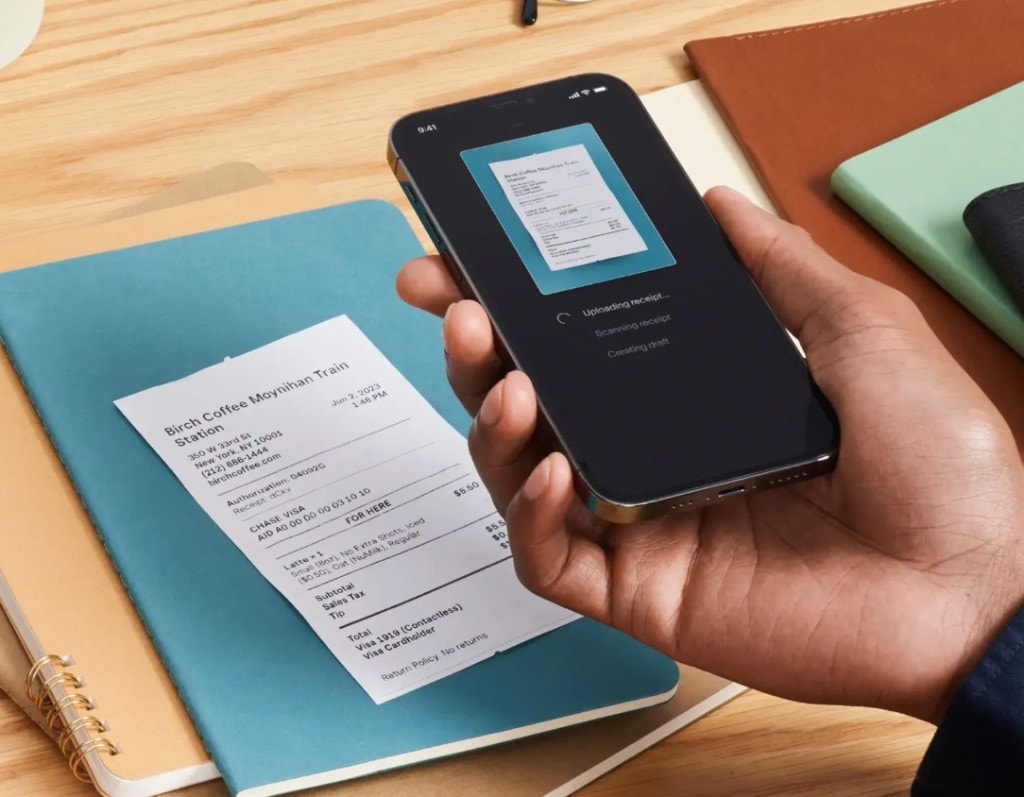
Separate software, travel, and consultant expenses for cleaner reporting.
Maintain consistent monthly books so filing season is less stressful.
Deliver structured records in one click when needed.
Built for project-driven businesses that need clarity without accounting overhead.
Keep architecture expenses structured across long engagements.
Good morning,
Joe 👋
Revenue
€8,420
Expenses
€2,180
Profit
€6,240
VAT Saved
€880
Prevent missing records from site visits and vendor invoices.
Profit
€4,220
Revenue
€8,420
Expenses
€259
Understand spending trends and support better project decisions.
Receipt
Coffee
Fuel
Tax
Invoice
Office
Meals
VAT
Upload
Files
Sorted
Done
Share clean records for faster review and filing.
Report package
Ready to sendStep 1
Save project expenses as they happen across office and field work.
City Coffee House
04/25/2026
Step 2
Separate project costs, consultant fees, and overhead categories.
Step 3
Check cost trends and maintain margin visibility.
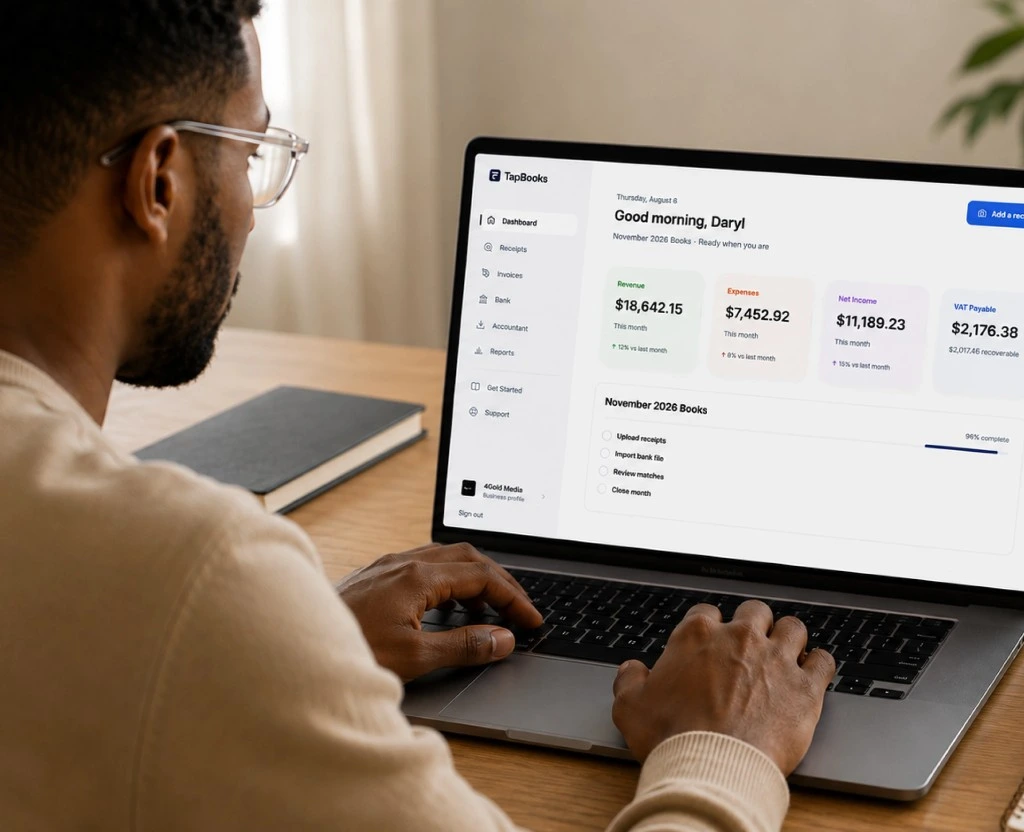
Step 4
Send a structured month-end package in one click.
Ready to export
Architects need practical monthly bookkeeping and clear project cost visibility.
TapBooks
Project-focused simplicity
Built for owner-led architecture workflows.
QuickBooks
Full accounting depth
Useful but often heavier than needed.
Spreadsheets
Manual process
Hard to maintain across long projects.
TapBooks
Fast receipt capture
Capture field and vendor receipts quickly.
QuickBooks
Plan-based availability
Feature access varies.
Spreadsheets
No native capture
Manual entry workflow.
TapBooks
Clear categories
Track software, consultant, and site costs cleanly.
QuickBooks
Advanced structures
More setup and accounting management.
Spreadsheets
Custom columns
Manual consistency required.
TapBooks
One-click handoff
Clean files for fast accountant review.
QuickBooks
Comprehensive export tools
Strong for full accounting operations.
Spreadsheets
Manual package
Assemble records manually.
TapBooks
Quick setup
Start with receipts and categories fast.
QuickBooks
Longer setup
Needs broader accounting setup.
Spreadsheets
Quick to open
Slow to maintain.
TapBooks
Low
Designed for non-accountants.
QuickBooks
Higher
Accounting familiarity helps.
Spreadsheets
Low early
Higher as complexity grows.
TapBooks
Yes
Good for independent architects and small studios.
QuickBooks
Partial
Best for deeper accounting requirements.
Spreadsheets
Partial
Weak for recurring close workflows.
TapBooks
Clear monthly summaries
Simple spend visibility for decision-making.
QuickBooks
Deep financial reports
Extensive accounting report suite.
Spreadsheets
DIY reporting
Manual formulas and upkeep.
TapBooks
Free plan available
Simple paid upgrades when needed.
QuickBooks
Tiered plans
Costs increase with feature depth.
Spreadsheets
Low software cost
Higher manual labor cost.

Our project receipts used to be split across site visits and office invoices. TapBooks made month-end and accountant handoff much cleaner.
Marcus Bennett
Residential Architect
Hey there,
My name is Jochem, and I'm a small business owner just like you.
Bookkeeping has always been a headache for me.
When I started my first business, I used spreadsheets for everything. At first it worked, but as my business grew it became messy. Organizing invoices, bills and receipts often took me hours, and sometimes even a whole day.
Eventually I switched to "professional" bookkeeping software. I expected it to make my life easier, but honestly, I found it full of features I never used. It also felt way too complicated. There were so many things I simply didn't understand... because I'm not an accountant.
After years of frustration, I kept thinking there had to be a simpler way. Something built for freelancers and small business owners, with only the features you actually need.
That's why I built TapBooks.
I hope TapBooks helps you spend less time on bookkeeping and more time growing your business.
If you have any feedback, ideas or improvements, just send me an email. I read every message myself and I always reply.
Thanks for giving TapBooks a try.